
How to Choose a Top-Rated External Hard Drive for Your Meaningful Family Photos

Choosing the right top-rated external hard drive is essential for preserving your family’s digital memories. Learn about the differences between SATA and SSD drives, brand recommendations, and what to consider before purchasing to ensure your photos are safe and organized.
This post may contain affiliate links, which means that I may receive a commission if you make a purchase using these links. As an Amazon Associate, I earn from qualifying purchases.
I began my journey with computers back in the mid-1970s, a time when the world of technology was just beginning to take shape. I’ve had the unique privilege of witnessing how far we’ve come over the decades, from those early bulky machines that filled entire rooms to the sleek laptops and tablets we use today. It’s truly fascinating to reflect on this journey!
However, I completely understand how overwhelming it can feel to keep pace with all these rapid advancements, especially when it comes to digital storage options. Every few months, it seems there’s a new device or cloud service promising better performance or more capacity. One moment we’re learning about floppy disks and hard drives; the next, we’re navigating the complexities of SSDs and cloud storage solutions that seem almost like magic. It can be enough to make anyone feel a bit lost in this fast-moving digital landscape! But remember, you’re not alone in feeling this way—so many people are trying to adapt alongside us as technology continues its whirlwind evolution.

What is a Digital Photo Hub (DPH)?
A Digital Photo Hub is like a cozy nest for all your cherished family memories, serving as the central home for your entire collection of digital treasures. Imagine it as a special place where every photo, video, document, and even audio file comes together to tell the beautiful story of your family’s journey over the years. It’s not just about collecting; it’s about preserving those moments that make you smile and remind you of good times with loved ones.
To keep these precious memories safe and sound, it’s important to store everything in a single Digital Photo Hub (DPH). But don’t stop there! To safeguard against any unforeseen mishaps—like computer crashes or accidental deletions—you should maintain two additional copies for backup. One of these backups should ideally be kept off-site; think of cloud storage as a modern-day safety deposit box in the digital realm. This way, whether you’re reminiscing on an ordinary day or sharing laughs at family gatherings, you’ll always have peace of mind knowing that your irreplaceable memories are secure and easily accessible whenever you want to relive those joyful moments.
Not counting NAS (Network-Attached Storage) systems—many Family Photo Keepers might not even be familiar with that term, so there’s no need to fret if it’s new to you—there are three excellent places where your Digital Photo Hub could reside.
- First up is your computer. If you have sufficient storage space, this may seem like a convenient option for keeping your cherished memories organized and accessible at all times. However, with the ever-shrinking size of computer disk drives, this solution often isn’t ideal for most people. It’s easy for files to pile up and clutter your hard drive, leaving you scrambling for space when you least expect it.
- Next on the list is an external hard drive. This can be a great way to keep your photos safe while freeing up space on your computer. Just remember that these drives aren’t invincible; they typically need to be replaced every 3-5 years because they can wear out over time—much like the hard drives installed in our computers. So think of them as a dependable home for your digital treasures, but one that must be cared for.
- Finally, there’s cloud storage. While there are many options available today, I only recommend one service as a true Digital Photo Hub: Forever. It stands out not just for its reliability but also its focus on preserving memories long-term without the risk of losing them due to changing technology or company policies. There are other cloud-based services I trust for backing up photos—as safety nets—but they don’t quite measure up as permanent homes in the way Forever does.
Why You Need a Top-Rated External Hard Drive
Most people I work with will use an external hard drive as either their Digital Photo Hub or as one of their backups. That’s why it’s so important to choose a top-rated external hard drive.
An external hard drive is truly one of the best places to store your cherished Digital Photo Hub, especially if you’re like many of us who have amassed countless memories captured in photographs over the years. This includes 20 years of digital photos as well as 30+ years of printed ones that should be digitized for safekeeping.
Unlike the disk space on most computers these days, which can often leave us scrambling for room to save just one more precious image—a top-rated external hard drive offers a generous amount of additional storage capacity that can accommodate your growing collection with ease. So whether you’re a casual snapper or an avid photographer, investing in a reliable external hard drive is a smart choice for safeguarding those irreplaceable moments captured in time.
I only show one top-rated external hard drive on my Amazon Prime Days page, and that’s just for space reasons. There are actually several that I usually recommend, and I looked into more information about each to prepare this article for you.
Differences Between SATA and SSD Drives
First, I want to break down the key differences between SATA and SSD external hard drives, as well as the limitations of thumb drives. SATA drives are the traditional hard disk drives (HDDs) that most of us are familiar with. They are also called mechanical drives, and you can hear or feel the disk spinning when they are running. They offer large storage capacities at a lower cost per gigabyte. The downside is they can be slower and more prone to physical damage from drops or bumps.
Solid State Drives, or SSDs, on the other hand, are faster, more durable, and quieter, but they come at a higher price per GB. They are fully electronic, so they are silent. And although they are more durable, one important difference to note is that when a mechanical SATA hard drive goes bad, often most of the data on the drive can be recovered by a tech at a computer store. When an electronic drive goes bad, it’s all gone. Toast. But that’s why we have backups, right?
Limitations of Thumb Drives
Now, thumb drives may seem convenient, but they have their limitations. The storage is relatively small, they can be easily lost or damaged, and they’re not the best choice for Digital Photo Hubs. They are fine for transferring photos or even gifting them, but make sure that your recipient knows how to copy the content to their computer or another top-rated external hard drive so that they also have at least one backup copy.
Also, quality matters, especially with thumb drives (AKA flash drives). When my daughter was in college, she often prepared her class presentations on her computer and transferred them to a thumb drive to plug into the classroom presentation system. She tended to buy cheap ones at Walmart or other drug stores. Twice during college she had thumb drives come apart in her hand as she removed them from the computer.

Best Brands for a Top-Rated External Hard Drive
When it comes to top-rated external hard drive brands, here’s my take based on my latest research:
- Western Digital: Consistently solid performance and durability. Ratings around 4.7/5.
- Samsung: Reliable and fast, with good value. Ratings around 4.5/5.
- Toshiba: Good budget-friendly choice, but not as robust as the top brands. Ratings around 4.2/5.
- Seagate: Affordable options, but can be hit-or-miss on long-term reliability. Ratings around 4/5.
- SanDisk: Great for thumb drives, but their external HDDs are just average. Ratings around 4/5.
Ultimately, when purchasing a top-rated external hard drive, I’d recommend going with a Western Digital or Samsung external SSD for your Digital Photo Hub or your Backup Drive if speed and reliability are your top priorities. For sheer storage space on a budget, a Seagate SATA drive could be the way to go (this is what I’m currently using, and I plan to upgrade soon).
I’ve also been asked about using a PictureKeeper or PhotoStick as a Digital Photo Hub. I do not recommend this. First, my one and only experience with a PhotoStick was terrible. A client had used it to back up her photos from her computer, then deleted them off her computer because it was too full. She then wanted to upload them to Forever, and we had a heck of a time getting them off (it was protecting them from us). In addition, it did not keep any of the folder organization she had created on her computer, so she had to recreate that in Forever once all the photos were uploaded. Ain’t nobody got time for that!
As for PictureKeeper, I really love this product, but not as a Digital Photo Hub. It is great for gathering up your photos from all.the.places when you are in the Archive stage of the process. It can even get your photos from Facebook and your email (most email programs). It comes with software that you set up to look where you want it to look, and then it keeps them organized exactly as you have them on your computer (the folder organization). PictureKeeper can also be used as a backup external hard drive if your Digital Photo Hub is on your computer or in Forever.
Key Considerations Before Buying an External Hard Drive
Some other things to consider when purchasing a top-rated external hard drive:
- Size of drive: For most people, a 2TB drive will be sufficient. However, if you have a photographer in the family or have already digitized all your printed photos but haven’t deduplicated or organized, you may want a larger drive.
- Make sure you get the right one for your computer: Many drives are formatted for both Mac and PC, but some are formatted for only one of those operating systems.
- Reformat the drive if necessary: I like to reformat drives when I get them to give me a fresh start. Many come with backup software and other things pre-installed, but if you’re using the drive for a Digital Photo Hub, it’s unnecessary and takes up valuable space.
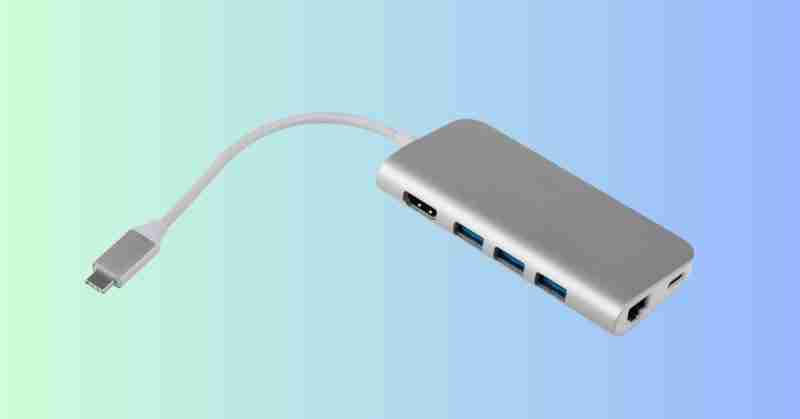
Lastly, remember to check the USB ports on your computer and the connector type on the drive. Many newer computers only come with USB-C ports, and many external hard drives come with USB-A connectors. USB-C tends to be a faster connection, but may cost more. A USB hub can be a simple solution if your drive and computer have different ports, or if you have limited ports and multiple external drives.
Make Sure to Protect Your Memories with a Top-Rated External Hard Drive
Choosing a top-rated external hard drive is crucial for safeguarding your meaningful family photos and digital memories. By considering factors like storage size, drive type (SATA vs. SSD), brand reputation, and compatibility with your devices, you can ensure you pick the right drive for your Digital Photo Hub. Don’t forget the importance of backups to protect your data, and always replace your drive every few years to prevent failure. With the right top-rated external hard drive, your family’s memories will be secure for years to come so you can enjoy your photos again as well as leave a meaningful collection for future generations.


